


Operating guide
ETHERNO, step by step
6 ETHERNO procedures from the user manual, with the real screen at every step: start the UPS; shut the UPS down; daily check of the readings; a fault is showing; a mains failure; transfer to maintenance bypass. Section numbers refer to the manual.
Daily use
Start the UPSBreakers, battery modules, ON/OFF, output breaker, loads — in the manual's order.§5.1 – 5.2 (p. 79), §2.1.3 (pp. 9–10), §2.1.5 · 8 steps
Before starting, with every breaker open (no power: the display is dark): wiring firm and color-coded, UPS grounded, N–PE voltage below 5 Vac, no short circuit on the output, load not above rating. Also: RS485 wiring if remote monitoring is used, wiring neat and tied, maintenance-bypass cover fitted and its breaker OFF, EPO input shorted (or wired to a closed remote EPO switch).
Caution Check the N–PE voltage with a meter: above 5 Vac the grounding is not good enough (§5.1).
Close the input and bypass breakers. The touch screen lights and initializes.
You should see Screen initializes, then the main page shows Bypass output (bypass → output, mains → REC. charging the battery).
Caution The load is already powered through the bypass.
Bypass output Turn the knob of every battery module to the closed padlock: all green run indicators light.
Caution With the knob on the closed padlock the module switches on and its output connector carries DC voltage.
Bypass output Tap the ON/OFF icon, bottom of the left column (or press both ON buttons under the screen for 1 s).
Press: ON / OFF
You should see “Confirm to power on?”
Bypass output Confirm with OK.
Press: OK
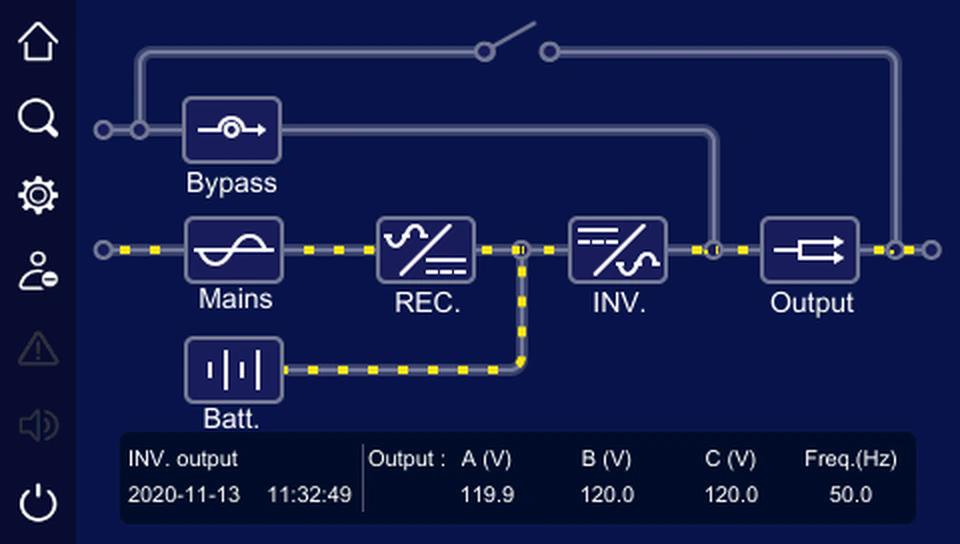
You should see Inverter starting; about 10 s later the main page shows yellow energy flow: mains → rectifier → inverter → output.
Confirm power on Close the OUTPUT breaker on the rear panel.
You should see Normal operation: INPUT, BYPASS and OUTPUT ON, maintenance bypass OFF.
Mains inverting (normal mode) When the UPS runs steadily, switch on the loads, largest first and smallest last.
Caution Starting a large load last could trigger the overload protection.
Mains inverting (normal mode) Check the output: tap Output on the flow diagram.
Press: Output information
You should see Output voltage, current, load % and frequency per phase.
Mains inverting (normal mode)
Shut the UPS downCool-down, ON/OFF, battery modules off, breakers open.§5.3 (p. 80) · 6 steps
Switch off the loads and let the UPS run without load for about 10 minutes.
Why The fans carry the heat out before the UPS stops (§5.3).
Mains inverting (normal mode) Tap the ON/OFF icon (or press both OFF keys under the screen together for 1 s).
Press: ON / OFF
You should see “Confirm to power off?”
Mains inverting (normal mode) Confirm with OK.
Press: OK
You should see Bypass output: inverter off, the load is still fed by the bypass.
Caution The load stays powered through the bypass until the input and bypass breakers are opened.
Confirm power off Turn the knob of every battery module to the open padlock: all module indicators go off.
You should see Module run, alarm and fault indicators all off (“Switched off (knob)” in the Battery modules list).
Bypass output Open the INPUT and BYPASS breakers.
You should see The output stops; the screen goes dark once the UPS has no power left.
Caution Dangerous voltage can remain inside even when the UPS is off.
Main page — no output (initializing or bypass unavailable) To isolate the UPS completely, also open the OUTPUT breaker and the upstream breakers.
You should see All breakers OFF, maintenance-bypass cover fitted.
Daily check of the readingsBypass, mains, battery and output pages from the flow diagram.§4.2 · 11 steps
From the main page, tap Bypass.
Press: Bypass information
Why Phase voltages are shown (the nameplate gives line voltage).
Mains inverting (normal mode) Back to the main page: tap Back.
Press: Back
Bypass information Tap Mains.
Press: Mains information
Mains inverting (normal mode) Back.
Press: Back
Mains information Tap Batt.: battery voltage, currents, SOC, SOH.
Press: Battery information
Mains inverting (normal mode) Next page: remaining backup time.
Press: Next
Battery cabinet info 1 Mod. info: each battery module in detail.
Press: Mod. info.
Battery cabinet info 2 Pick another module with the box bottom left.
Press: Select module
Module info 1 Choose Mod.2.
Press: Mod.2
Module selection Home, then Output.
Press: Home
Module info 1 Tap Output: voltage, current, power, load % and frequency.
Press: Output information
Mains inverting (normal mode)
Alarms & faults
A fault is showingRead it, mute it, find it in the history.§4.6, §4.7, §5.9 · 5 steps
The alarm icon on the left is lit; the buzzer sounds when the UPS is on (Table 5-2 — this picture is in the off state, so it is silent).
You should hear Depends on the fault — see the Alarms & buzzer tab.
Fault alarm status Tap the alarm icon.
Press: Current fault
You should see The current faults with date and time.
Fault alarm status Back to the main page.
Press: Back
Current fault Tap the buzzer icon to mute.
Press: Buzzer
Caution A long beep cannot be muted (§4.7).
Fault alarm status Look the fault up in the Alarms & buzzer and Troubleshooting tabs; History record keeps it after it clears.
History record
A mains failureWhat the screen shows on battery and how long is left.§2.2.2 · 4 steps
The mains fails: the battery feeds the inverter with no break. The Mains icon is red.
You should hear Mains abnormal: 3 alarms every 10 s.
Battery inverting Tap Batt. to see how long is left.
Press: Battery information
Battery inverting Next page: remaining time at this load.
Press: Next
Why Decide whether to shut the loads down before the battery reaches its low-voltage point.
Battery cabinet info 1 If the mains does not come back, the UPS stops at the battery low-voltage point (long beep) and shuts itself down about 1 min after a complete outage. It restarts by itself when the mains returns.
Battery cabinet info 2
Transfer to maintenance bypassKeep the load powered while the UPS is worked on.§2.1.3 (pp. 9–10), §2.2.2 (p. 22) · 6 steps
The UPS runs normally. On the maintenance bypass the load runs on unprotected utility power.
Mains inverting (normal mode) Remove the cover of the maintenance-bypass breaker (rear panel). The door switch opens: the UPS turns its inverter off and transfers the load to bypass. Check that the main page shows Bypass output.
Bypass output Close the MAINTENANCE breaker.
You should see Maintenance-bypass output: the alarm icon lit (maintenance bypass detection).
Maintenance bypass Open the INPUT, BYPASS and OUTPUT breakers. The load is fed through the maintenance bypass; the UPS input and output are disconnected.
To service the UPS, also turn the knob of every battery module to the open padlock, and wait 10 minutes.
Caution Hazardous voltage can be present inside even when the UPS is not operating: check with a meter before touching anything.
Return: turn every module knob to the closed padlock; close the INPUT, BYPASS and OUTPUT breakers, in that order; when the touchscreen shows the bypass output voltage, open the MAINTENANCE breaker; refit its cover; press both ON keys for 1 s.
Press: ON keys (hold 1 s)
You should see About 10 s later the main page shows normal mode.
Bypass output
27 more ETHERNO procedures, settings, commissioning, parallel systems and service, with the full display simulator, are in the AEC partner portal.
Alarms and buzzer
| Fault shown | Buzzer | Meaning |
|---|---|---|
| EPO | Long beep | Emergency power off: bypass and inverter outputs all closed. For the EPO input terminal: released after full shutdown and the port short-circuited again (§2.1.5). |
| Mode fault | Long beep | System mode setting does not match the wiring: check mains and bypass wiring against the set mode. |
| Maintenance bypass fault | Long beep | Maintenance-bypass protection, inverter output off: check the maintenance-bypass cover and door switch, and the maintenance-bypass detection port on the backplane. |
| Output fault | Long beep | Output short circuit or overload. |
| Mode mismatch | Long beep | Parallel: input/output mode differs between UPS. |
| Voltage mismatch | Long beep | Parallel: output voltage setting differs. |
| Frequency mismatch | Long beep | Parallel: frequency setting differs. |
| Bypass mismatch | Long beep | Parallel: bypass voltage or frequency setting differs. |
| Pattern mismatch | Long beep | Parallel: parallel mode setting differs. |
| Power mismatch | Long beep | Parallel: output power setting differs. |
| Battery number mismatch | Long beep | Parallel: the battery module quantity of this UPS differs from the system. |
| Parallel mismatch | Long beep | Parallel: parameter settings differ. |
| Short mismatch | Long beep | Parallel: “short circuit to bypass” setting differs. |
| Two-ended fault | Long beep | Parallel cable off at both ends. |
| Single-ended fault | Slow beep | Parallel cable off at one end. |
| Auxiliary power supply failure | Long beep | Internal power supply failed; if it does not recover, call service. |
| Fan failure | Rapid beep (about every 0.2 s) | Check fans for damage or blockage. |
| CAN fault | Slow beep (about every 2 s) | Parallel CAN communication abnormal: parallel cable damaged, or only one UPS running. |
| SCI fault | Long beep | Internal communication abnormal; if it persists, call service. |
| No redundancy in the parallel UPS | Slow beep (about every 2 s) | Total load of the parallel system is above the full load of one UPS: the load is above the redundancy limit. |
| Mains abnormal — phase sequence | Long beep | Mains input phase sequence wrong: check input wiring. |
| Mains abnormal | 3 alarms every 10 s | Missing neutral, outage, over/under-voltage, over/under-frequency: check the mains input. |
| Bypass abnormal | Slow beep (about every 2 s) | In normal mode the bypass voltage, frequency or phase sequence is abnormal, or the mode setting does not match the wiring: check the bypass breaker is closed, the bypass phase sequence, and that the bypass wiring matches the system mode. |
| Battery abnormal — over-voltage | Slow beep (about every 2 s) | Battery overvoltage protection, charging fuse failure or overvoltage alarm: check the battery. |
| Battery abnormal — wiring / under-voltage | Rapid beep (about every 0.2 s) | Battery wiring fault, charger short circuit, undervoltage protection or undervoltage warning: check the module plug-ins and the battery status. |
| Battery abnormal — charging temperature high | No beep | Battery charging temperature too high. |
| Rectifier abnormal | Rapid beep (about every 0.2 s) | Rectifier fault. Contact AEC service. |
| Inverter abnormal | Long beep | Inverter fault. Contact AEC service. |
Troubleshooting
Mains is normal, the UPS outputs but runs on battery and beeps intermittently
- Contactors or input terminals loose or damaged.
- Mains voltage or frequency on the screen out of the allowed range.
- Mains input breaker open: close it.
Connecting the UPS blows the fuse or trips the breaker
- Input or output wiring short-circuited.
Screen and output normal, but output stops as soon as the load is connected
- Severe overload or output short circuit: reduce the load or find the short (often a faulty power strip or a damaged load).
- Loads not started biggest-first: restart, then start the large loads first.
Long beep, fault indicator on, UPS on bypass, inverter failure
- Output overload above rating: reduce load or use a larger UPS. A short transfer on a load inrush that recovers by itself is normal.
- Over-temperature: air inlet/outlet blocked or room too hot.
On a power failure it does not go to battery, or reaches battery under-voltage quickly
- Modules with lost capacity: check their SOH and replace them.
- Charger fault: the battery is not being charged.
- Module plug-in loose or bad contact.
On a power failure the UPS keeps running but the computers halt
- Poor grounding: N–PE floating voltage too high.
Module quantity on screen differs from the modules installed
- Li-batt. module quantity in Batt. manage not set to the real number.
Mains normal, SOC below 80 %, the lithium modules do not charge
- UPS charging voltage out of the allowed range.
- Module plug-in loose.
- Lithium battery switched off (Batt. manage → Li-batt. ON).
The lithium system protects as soon as it starts discharging
- Load above the battery system's rated output: reduce the load or add modules.
- Not charged for a long time: low SOC or damaged cells.
On battery the system shuts down after a while
- Normal end-of-discharge low-voltage protection; it restarts and recharges when mains returns.
Red indicator on a lithium module
- Low-SOC protection.
- Operating temperature out of range or module fan not running.
- Module fault: replace the module (switch it off, remove it, call AEC service).
Practice
Follow it on the display.
Short guided tours on the real ETHERNO display.
Mains inverting (normal mode)
Shut the UPS down
Switch off the loads and let the UPS run without load for about 10 minutes.
You see
Need a technician?
AEC service supports commissioning, maintenance and 24/7 after-sales: tell us the UPS and what it shows.